Chatlighter
Saving the useful moment, not the whole conversation
OVERVIEW
I designed Chatlighter, a Chrome extension that lets users highlight and save specific moments from AI conversations instead of keeping entire threads. The experience is designed around quick capture first, with lightweight organization available when users need it later.
Time Aug 2026
Role UX Design · Interaction Design · Prototyping
Tools Figma, HTML/CSS/JavaScript, Chrome Extension API
PROBLEM
Important information gets buried inside long AI conversations.
As AI conversations grow through follow-up questions and revisions, a useful answer can become difficult to find again. Users may only need one specific paragraph, recommendation, or decision, but retrieving it often means reopening and searching through the entire conversation.
DISCOVERY
How are people actually keeping track of useful AI conversations?
I surveyed 10 frequent AI users to understand how they revisit, save, and manage useful information from past AI conversations.
10 participants · Frequent AI users · 5–10 min · Online survey (Multiple-choice + open-ended questions)


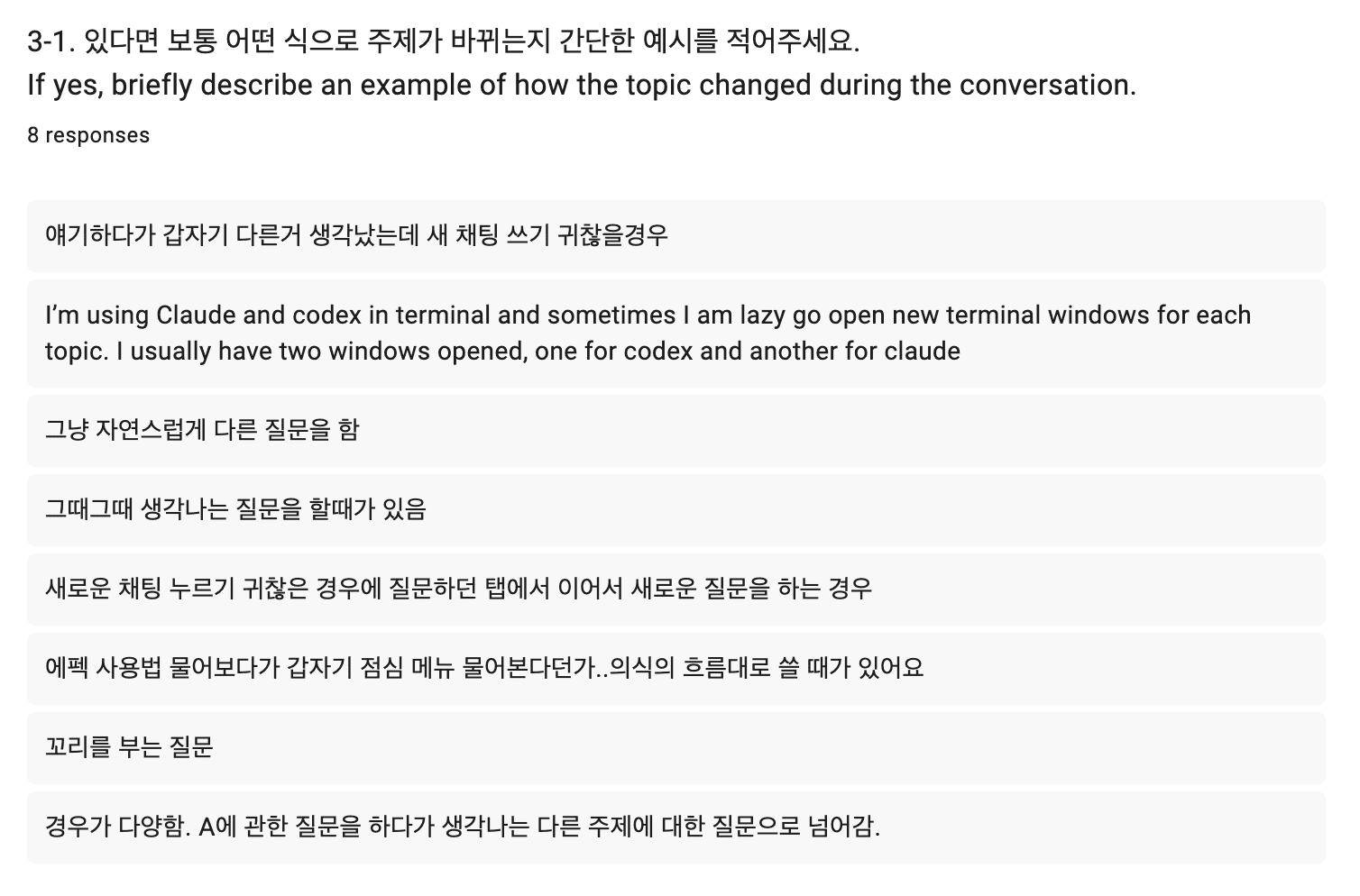


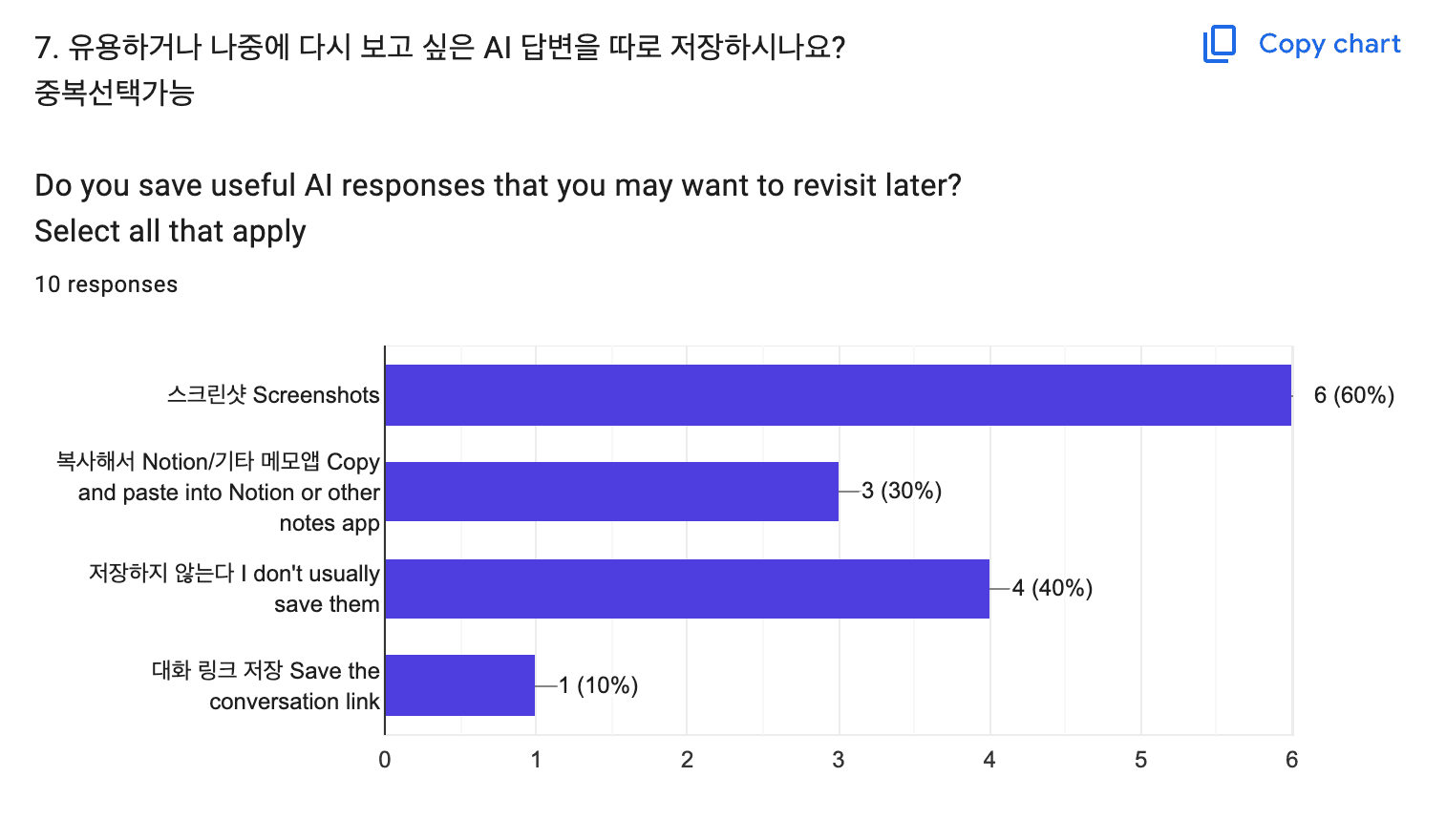


Survey conducted in Korean and English. Korean responses were translated into English for this case study.
Three patterns emerged
01 — Useful information doesn’t always align with the conversation.
90%often or sometimes switch topics within the same chat, while only 2 selections indicated needing the entire conversation again.
→ Users need to capture the part that matters, not necessarily the whole thread.
02 — Retrieval is common, but still manual.
9 of 10 returned to past conversations for specific information. 6 of 10 reopened the thread and scrolled to find it.
“There were too many conversations, and I eventually couldn’t find it.”
→ Saved conversations are not always easily retrievable.
03 — Current workarounds lose context.
60% used screenshots and 30% moved useful responses into external notes.
“I wish there were a way to save things like Pinterest.”
→ Capture should stay lightweight while preserving the original context.
02 — Retrieval is common, but still manual.
9 of 10 returned to past conversations for specific information. 6 of 10 reopened the thread and scrolled to find it.
“There were too many conversations, and I eventually couldn’t find it.”
→ Saved conversations are not always easily retrievable.
01 / Retrieval is built around conversations

Existing tools are strong at retrieving conversations, but the unit of retrieval is usually larger than the individual insight a user may want to revisit.
ChatGPT and Claude already support ways to search, revisit, and organize past conversations or projects.
→ The primary unit of retrieval is still the conversation or project.

02 / Useful information often lives inside a larger conversation
Existing tools are strong at retrieving conversations, but the unit of retrieval is usually larger than the individual insight a user may want to revisit.
A single conversation can contain multiple explanations, recommendations, references, and decisions.
→ Returning to one useful moment can still mean reopening the conversation and locating it within the surrounding context.
03 / Saving creates a second problem
Existing tools are strong at retrieving conversations, but the unit of retrieval is usually larger than the individual insight a user may want to revisit.
AI conversations are increasingly used for research, learning, planning, and problem solving. But as conversations accumulate, valuable insights become difficult to retrieve and reuse.
PROBLEM EXPLORATION Research / Observation
The interpretation is a starting point, not a conclusion.
Users can reshape the initial interpretation through five emotional dimensions, while Style controls how sparsely or fully the music is arranged.
INPUT
“I wanna be alone today.”
↓
INITIAL INTERPRETATION
↓
EMOTIONAL DIMENSIONS
ENERGY
TENSION
STABILITY
OPENNESS
VALENCE
↓
↓
SOUND
↓
tempo / tone / rthythm / space
+style (controls musical density and arrangement)
↓
VISUAL
↓
color / scale / motion / density
↓
EXPERIENCE
↓
USER ADJUST
Mapping Emotion to Sound & Visual
Each emotional dimension controls a specific set of sound and visual behaviors.
Control
Sound
Visual
Energy
BPM / intensity
pulse / breathing
Tension
hat & rhythmic density
pixel scale
Stability
variation / preset changes
scatter / flicker
Openness
reverb / stereo width / delay
spacing
Valence
brightness / tonal register
color palette
Style
arrangement / layer density
—
01 ENERGY
Tempo / Pulse
Energy controls the pace and physical intensity of the experience.
Higher values increase the tempo and make the visual pulse faster and stronger.
Low
Slower / Softer pulse
High
Faster / Stronger pulse
02 TENSION
Rhythmic Density / Pixel Resolution
Tension changes the density and sharpness of the system.
Higher tension introduces tighter percussion and breaks the visual into finer pixels.


Low tension
0
Mid
50
High tension
100
03 STABILITY
Pattern Variation / Scatter
Stability controls how fixed or variable the system feels.
Lower values shift rhythmic patterns and scatter the outer pixels, while higher values return both toward a more consistent structure.


Unstable
0
Mid
50
Stable
100
04 OPENNESS
Spatial Depth / Spacing
Openness expands the perceived space of the experience.
Higher values introduce more reverb, delay, and stereo width while increasing the spacing between pixels.


Low
Closed
High
Open
05 VALENCE
Tonal Brightness / Color
Valence shifts the tonal and visual brightness of the system.
Higher values open the sound filters while moving the visual through a brighter color palette.
Low
0 - 40
Mid
40 - 60
High
60 - 100
+ STYLE
Shaping the Arrangement
Alongside the five emotional dimensions, Style controls how fully the musical arrangement develops—from a minimal groove to a more layered house composition.
EXPERIENCE
01 — Express your emotion
Describe how you’re feeling in your own words.
EMO HOUSE interprets your input and translates it into an initial sound and visual experience.

02 — Reshape the interpretation
Use the sliders to adjust the initial interpretation and shape it closer to how you actually feel.
Changes are reflected in the sound and visuals in real time.

03 — Save your mix
Save your customized experience to build a personal playlist you can return to and replay anytime.

Try the prototype ↗
REFLECTION
Designing emotion is less about defining how someone feels, and more about creating space for them to shape it.
EMO House began as a system for translating emotional input into sound and visuals, but the process showed me that the initial interpretation should never be the final answer. By allowing users to adjust the dimensions themselves, the experience shifted from simply representing emotion to giving users control over how it is expressed.
그리고 생각보다 음악을 컨트롤하는게 힘들었음 내용 추가
Next →